Cricket lesson, facility & group booking software
Publish private lessons, group sessions, and facility reservations. Players pick an open time and book it.
Next, choose repeating weekly hours or exact dates and set the spots per time. Players pay the price when they book.
- Free plan, no credit card
- No limit on booking pages
- Private or group times
Cricket lessons, group sessions, and facility rentals
Create a booking page for each lesson, session, or space you offer. Players open its link, pick an open time, and book it.
-
Private lessons
Set one spot per time so each lesson goes to one player. Players pick an open time from your booking page.
-
Group sessions and clinics
Let several players book the same time until it's full, with up to 500 spots per time. Players see how many spots are left.
-
Court and facility rentals
Rent out courts and fields from weekly hours you set day by day. Choose the booking length and how often a new booking can start.
-
Tryouts and one-off dates
Add the exact dates and times for a tryout, a camp, or a one-off clinic instead of weekly hours.
-
Payments at booking
Set a price per participant and players pay online when they book. Add products such as gear or merchandise to the checkout.
-
Priority for registered players
Choose the registrations that qualify, then give those players an earlier booking window, a lower price or included bookings, or spots that drop-in players can't take.
Players book, you see every booking
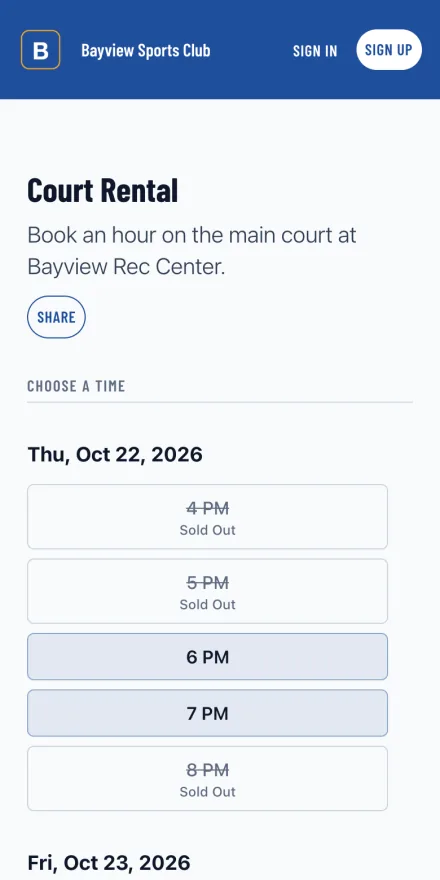
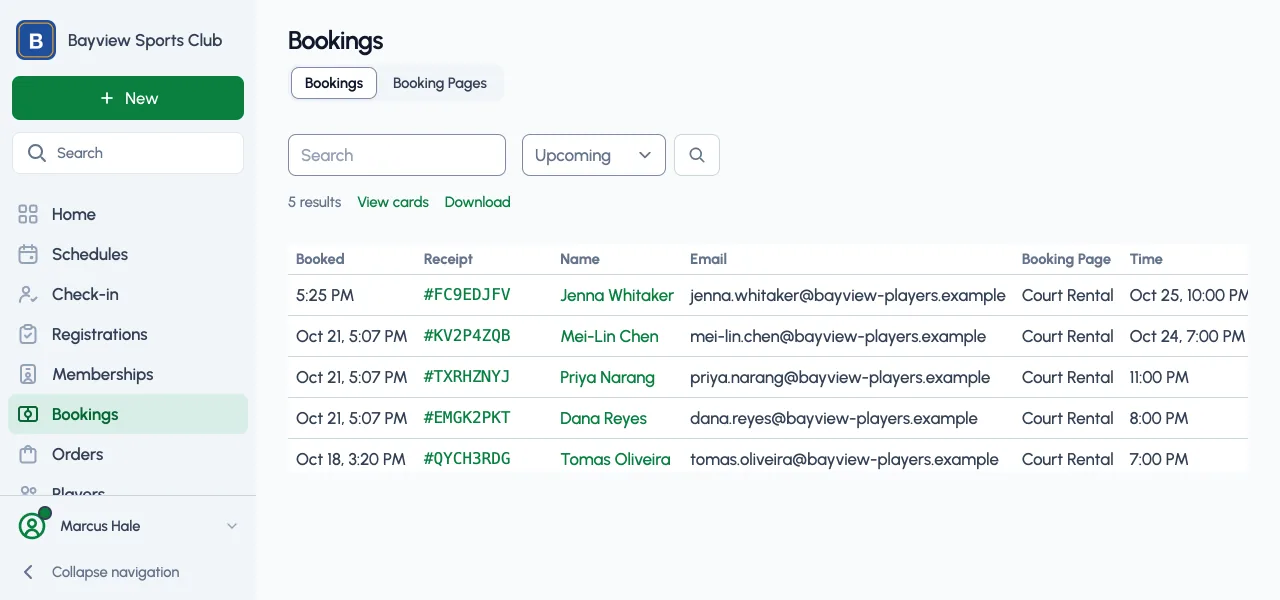
Your booking page shows the open times by day. Each booking appears in your dashboard with its time, status, and amount.
Players pick an open time
Players see each day's open times, with the spots left in group times, and pick one from your booking page.
Every booking in one table
Who booked, which booking page and time, the status, and the amount. Filter to upcoming, canceled, or pending bookings, or download them as a CSV.
Cricket booking features
-
Private lessons, group sessions, clinics, tryouts, and facility reservations
-
Repeating weekly hours, set day by day, or specific dates and times
-
From 1 spot per time for private bookings to 500 for groups
-
Booking length and how often a new booking can start
-
How many days ahead players can book, and when booking opens before each time
-
A weekly booking limit per player, up to 4
-
A cancellation cutoff before each time
-
Spots left and full times shown without other players' names
-
Earlier booking, lower prices, or reserved spots for registered players
-
Online payments when players book, and products such as gear or merchandise at checkout
-
Waivers players sign when they book
-
Cancel a time with a message to the players booked, and a refund for paid bookings
-
Check players in at each booking time
-
Every booking in one table, ready to download as a CSV
-
One link to share, and a place on your organization's website
-
Refresh future booking times after you change your hours
-
Looking for a feature? We release updates regularly. Let us know
Common questions
Is it free to publish booking pages?
Yes. Every plan, Free included, publishes as many booking pages as you need, with no credit card. On Free, paid bookings carry a 3% Playpass fee, and each paid plan lowers it.
How do players pay?
Online, when they book. Set a price per participant, connect Stripe, and payments go to your Stripe account. Set the price to 0 for free bookings.
Can several players book the same time?
Yes. Set the spots per time: 1 for a private lesson or an exclusive court, or up to 500 for a group session. Players see the spots left, and a full time shows as sold out.
Can I offer weekly hours and one-off dates?
Each booking page uses one or the other: repeating weekly hours, set day by day, or the exact dates and times you add.
Can I limit how often a player books?
Yes. Set a weekly limit per player on each booking page, up to 4 bookings, and a cancellation cutoff in hours before each time.
Can registered players book first or pay less?
Yes. Pick the registrations that qualify, then give those players an earlier booking window, a lower price or included bookings, or spots that drop-in players can't take. Only individual registrations qualify.
Free for every booking page
Publish as many booking pages as you need on any plan. Upgrade when more people help run them or you want to message your players.
-
Free plan
$0
As many booking pages as you need, with one manager and a 3% Playpass fee on paid bookings.
-
Paid plans
From $9/month
More managers to share the work, and messages to your players. Each paid plan lowers the payment fee, down to 1% on Max. New organizations can try Pro free for 14 days.
-
Nonprofits
50% off
Registered nonprofits save on every paid plan, from $4.50/month. Community programs that charge players little or nothing and run mainly on donations or grants can apply to Sports for Good for the Pro plan at no cost.
Use Playpass Free for as long as you want
Everything you need to run your league or tournament